FALL 2026 UPDATE
goHeather is now a full legal AI. Create documents, review documents, research the law.
Try For Free Now




Version 3 is here. It is the biggest release we have shipped, bigger than everything since launch put together, and it changes what goHeather is: goHeather is now chat-native, and goHeather can now draft contracts from scratch.
Until now, goHeather was a contract review app. You uploaded a contract, clicked a button, and worked through the results. That worked, but the app decided the workflow and you followed it, and if what you needed was not on a button, you were out of luck.
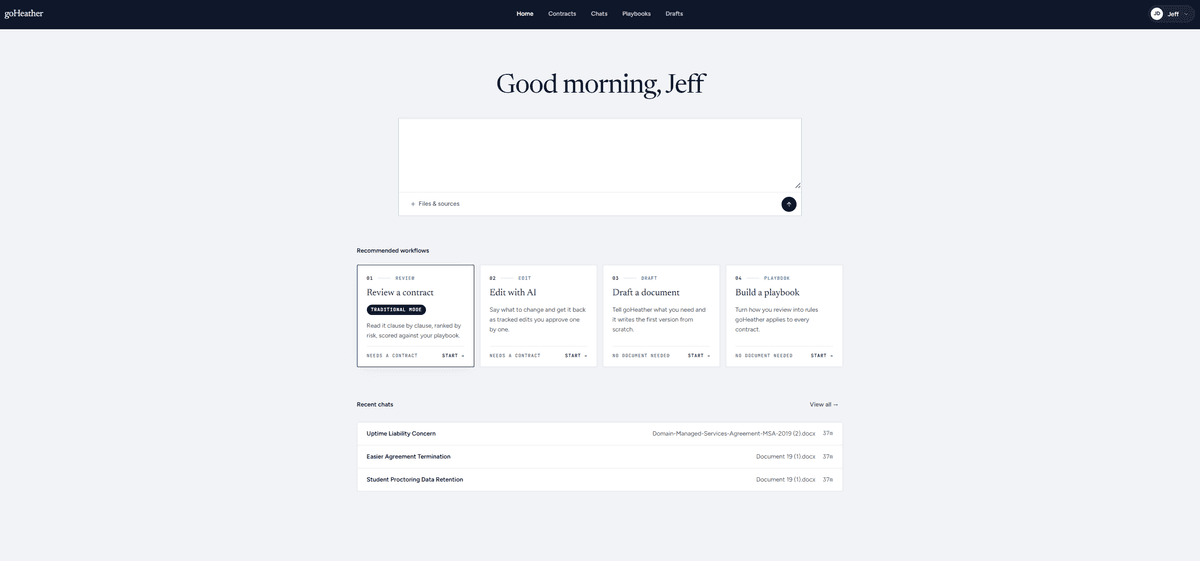
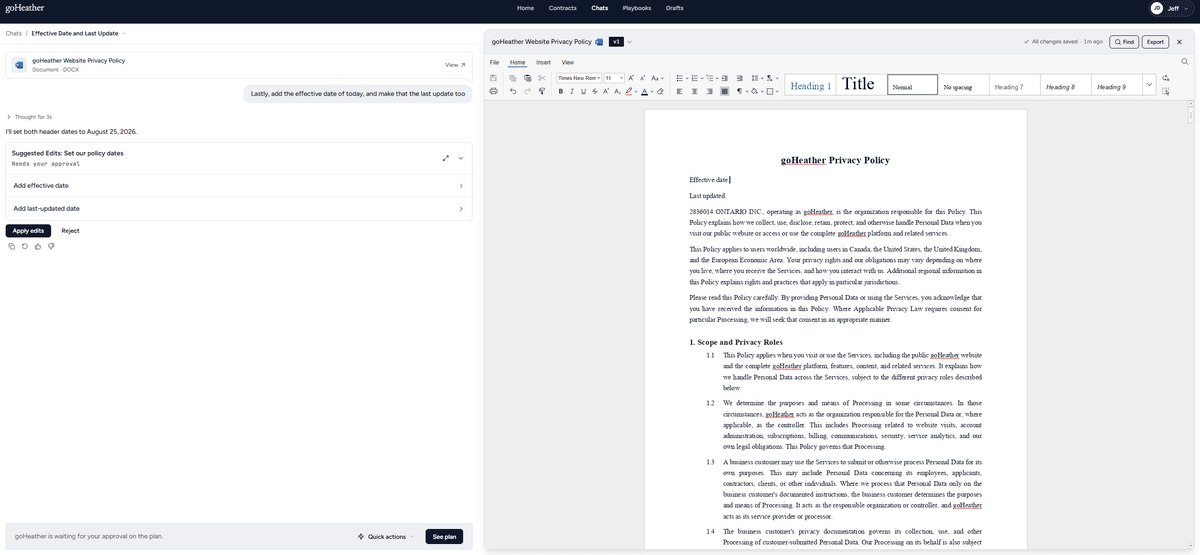
Version 3 changes the shape of the product. You open a conversation and tell goHeather what you need: review this document, redline it against our playbook, draft a consulting agreement, compare this amendment against the original, explain what the notice terms require you to do by when. The conversation is now the front door for legal work. Reviews, redlines, drafts, playbook checks and plain questions all start from the same place.
You can also start a chat with no document in it. Ask a question, get an answer, and decide later whether a document needs to be involved at all. If you upload something mid-conversation and it turns out to be the document you want to work on, goHeather can promote it to the document being edited without you starting over. Anything else you upload rides along as a reference document: a side letter, an amendment, the other side's markup.
goHeather is no longer a contract review AI, it is a legal AI. And under the hood, v3 always runs on the newest generation of AI models, which you will notice in the quality of the chat responses, redlines and the drafting.
goHeather now drafts contracts from scratch. We call it the first of its kind AI contract generator because of how it drafts, not just that it drafts: as far as we know, no other tool outlines a document for your approval and then opens up your AI-generated document in a purpose-built docx editor to review it. All the while, it streams the document to you section by section as it is written, flagging its own weak sections for your review instead of papering over them.
Here is the flow. Describe the document you have in mind. goHeather asks the questions it needs answered, and every question has a "choose for me" option if you do not have a view on it yet. You get a facts sheet you can check, then an outline, then the sections streaming in as they are written, then a Word file to view and edit in our in-browser docx editor.
The questions themselves are proper forms, not one line at a time in the chat: options to pick, fields that know a date is a date and a dollar amount is a dollar amount.
Two things worth knowing about how it behaves. It will not guess at the facts, and it only fills in what you left blank at the end, so the document reflects your answers rather than its assumptions. And if a section comes out weak, it ships right in our document reviewer web editor flagged for your review. We would rather show you where to look than hand you something polished-looking that has not earned it.
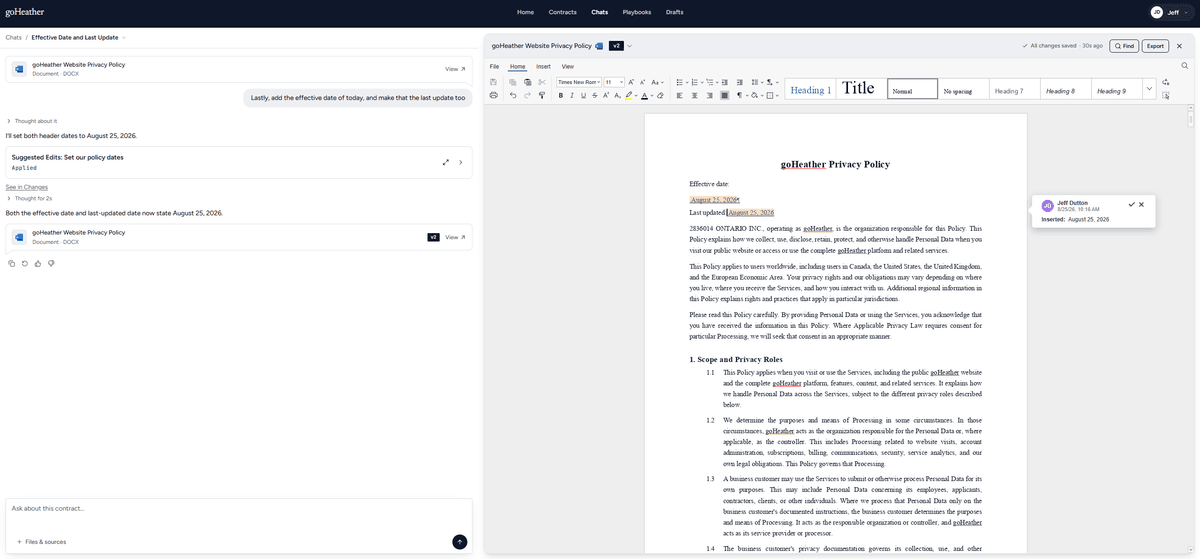
Edits to a draft go through the chat rather than a separate outline editor. Tell it what to change and it changes it. Drafts also live in their own tab now, so unfinished work stays out of your contracts list until it is actually a contract.
The goHeather legal AI document generator can make any kind of legal document like a contract or a memo or a pleading. It can also make more niche documents like blog posts for law firms, Tables of Authorities, anything.
Behind the chat-native shift sits a rebuild of the whole conversation surface. A chat with a contract, a chat without one, and an empty chat used to be three different screens wearing the same address, and you could see the seams: opening a conversation from history flashed several screens before settling, and attaching a contract rebuilt the page around you.
Now it is one surface. Attaching a contract slides the document in next to the thread and keeps your messages, your scroll position, and anything half-typed in the box. The composer shows a chip for the contract the conversation is about, from the first message onward, with one click to open it. Every composer has the same "Files and sources" menu, so uploading a contract, choosing an existing one, or adding reference files works the same way everywhere.
Problems stay in their lane too. A contract that is loading, missing, or inaccessible degrades the document panel only. The conversation keeps working.
A full contract review started from a chat now shows up as a card in that chat, with the legal summary right there in the thread. No second panel showing you the same memo again.
When goHeather is waiting on you, the card gives you the actions instead of making you go find them: see the questions, skip them all, apply all pending edits, dismiss all pending, finish the review. Closing the document no longer closes the review, so you can read the review on its own.
A running review also blocks only its own conversation now, not the whole contract. You can open another chat on the same document and keep working while the review runs.
A full review now splits the contract into clauses better and reviews them in parallel instead of working through the whole document in one long pass. Reviews that used to take several minutes come back in a fraction of that. If you review at volume, this one compounds.
Review findings can be flagged as unacceptable, and flagged items collect in a Negotiation list to be sent to the other side in a done-for-you memo, so the terms you intend to push back on live in one place instead of your memory. Paired with the downloadable list of unacceptable edits from last month, that is the start-to-finish path: flag it in review, keep it in the negotiation list, send the other side the list.
The edits list used to split everything three ways by where it came from: playbook, standard review, and chat. Each with its own applied and dismissed section. Since everything now comes through the chat, that grouping was two extra layers between you and the list.
It is one list, called Changes. Applied and dismissed, nothing above them.
Revert is gone from that list. Edits go into the document as tracked changes, so you reject them in the document. The list is the record of what happened.
This one matters if you have ever tried to work out which version of a redline is the real one. The old rule minted a version when you started working, not when the file changed, so sending a message or answering a clarifying question was enough to cut one. Going from chat to review and back to chat added three versions to a document that was byte for byte identical.
The rule now is simple: no new file, no new version. Applying edits, reviewing redlines, uploading and converting all create versions. Sending a message does not. Each version is named for the turn that produced it, so the history reads like what happened. If you have been fighting the same problem across email and shared drives, we wrote about keeping track of which redline is current a while back.
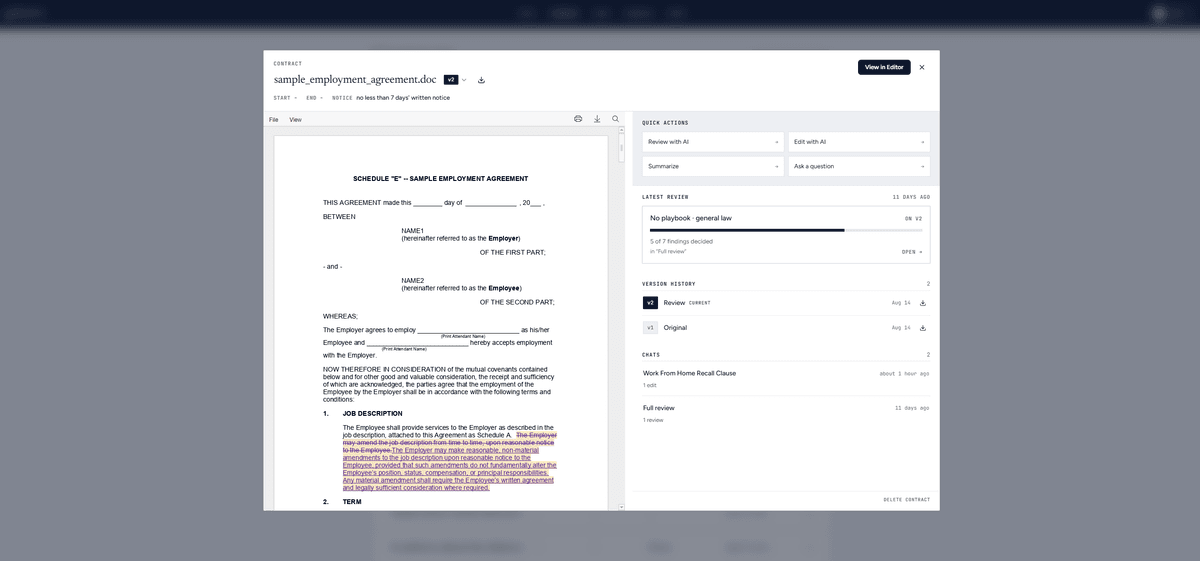
Clicking a contract used to drop you into whatever chat happened to be most recent. Now it opens a panel over the list with the document in read-only, the version chip, and the extracted start, end and notice dates at the top. Down the side: review with AI, edit with AI, summarize, ask a question, each one starting a fresh chat pointed at that job, plus every conversation on that contract, newest first. Rename, download and delete are all right there. A fresh upload with no conversations yet prompts you to review it.
A contract can have several conversations going, and you can now move between them from the contract name in the breadcrumb instead of hunting through the chats list.
The new chat list defaults to a plain date timeline: today, yesterday, last week, older. Past contract reviews are labelled so a screen of them is readable at a glance, a queued or failed review says so instead of looking identical to a finished one, and rows can finally be deleted. Search moved up into the header where you would look for it. And the list is scoped to the team you have selected rather than showing everything from every team you belong to.
Version 3.0 is live now in the goHeather Contract AI app.
Jeff Dutton is a lawyer who advises on technology, corporate, privacy, commercial, employment and real estate law.
Jeff founded his own small law firm, Dutton Law, in 2016 (and merged it with a larger firm in 2019). Before that, Jeff was a prosecutor and a commercial law lawyer at a national boutique law firm.
Jeffrey is a frequent lecturer on legal matters and has been published in newspapers and trade journals. In addition, Jeff was the editor and co-author of a leading employment law text for lawyers for many years.
Education:
Western University, BA (2009)
University of Ottawa, Faculty of Law, JD (2012)
Get the latest contract tips, updates, and exclusive content straight to your inbox. Subscribe now and never miss out on what's new in contract law or at goHeather!
Our AI sifts through each clause, identifying potential risks. This enables us to provide quick yet comprehensive contract reviews, equipping you with the legal information you need to make informed decisions.
USA
1 Sansome St., Suite 1400
San Francisco, CA 94104
United States
International
10 Dundas St. East, Suite 1002
Toronto, ON M5B 2G9
Canada