FALL 2026 UPDATE
goHeather is now a full legal AI. Create documents, review documents, research the law.
Try For Free Now



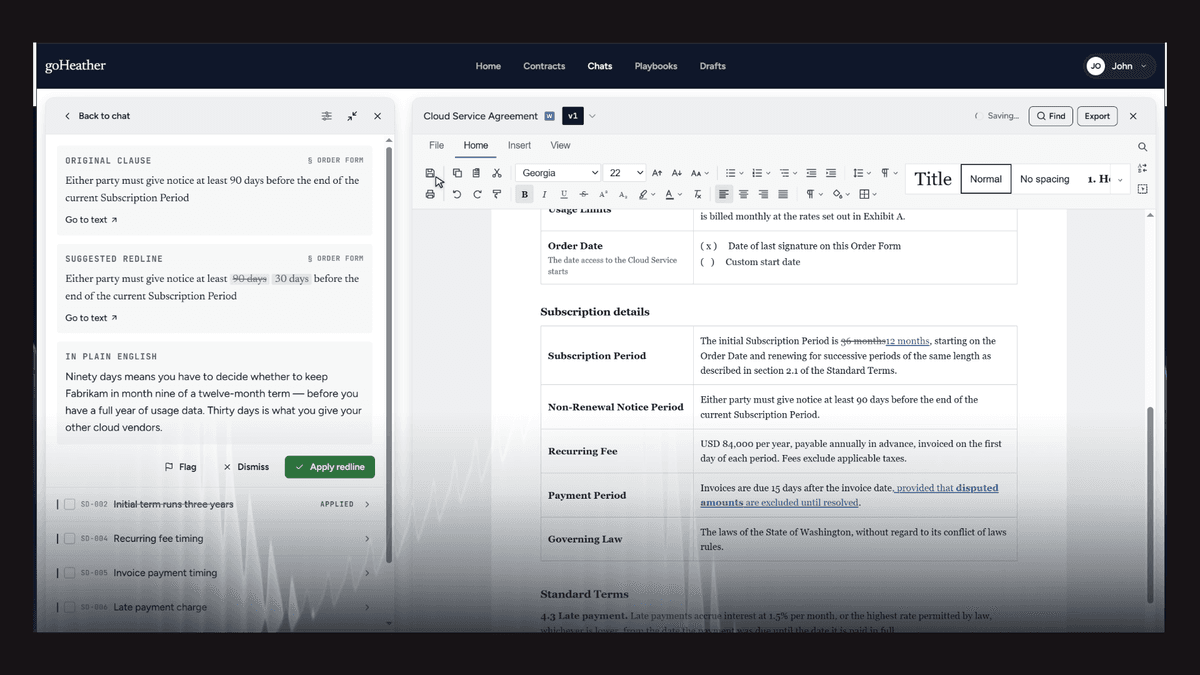
goHeather helps business teams draft, review, edit and redline contracts with AI. Over the past few weeks, we’ve added features that bring more of that work into a built-in document editor, where you can read your contract and apply changes as you go.
It’s built for in-house lawyers and the business teams they work with. Underneath, goHeather uses models from OpenAI, Anthropic, Google and Meta, with workflows designed specifically for contract work.
The core of goHeather is its document editor, which works like Microsoft Word. Your contract stays open in front of you while you review it, make changes or work through the AI’s suggestions.
When you apply a suggested edit, the change appears directly in the document. You don’t need to download another version or copy replacement text from a chat window into the right paragraph.
We call this surgical redlining: applying a specific change to the relevant part of an agreement, with tracked changes you can inspect.
For example, suppose your team has agreed to change a notice period from 60 days to 30 days. You can ask goHeather to update that language and review the proposed edit in the clause itself. You can see the surrounding wording while deciding whether to accept, reject or adjust the change.
That connection between a suggestion and the document matters. Producing replacement language is only part of the job. You still need to see exactly what changed and how it reads in context.
Drafting and review begin with a purpose-built workflow that establishes the context for the task. That includes the deal details, the jurisdiction, which side you’re on and any additional instructions or supporting documents.
Those details help guide the AI’s work. A review for the customer needs a different perspective from a review for the supplier. Your team’s preferred terms also matter.
You can use chat throughout the process to ask questions, explain what you want changed or refine a draft. The workflow gives that conversation a starting point grounded in the contract and the deal.
You can draft a contract from scratch or work from materials you already have, including past agreements, deal details, term sheets and supporting documents.
An earlier agreement can provide a starting point for a new draft. The current deal details give goHeather the information needed to adapt it. You still review the resulting document and decide what needs further work before sharing it.
For agreements you receive, goHeather’s AI contract review can flag potential issues and suggest edits. You can work through those suggestions with the agreement open, then apply the changes you choose.
The findings are proposals for your review. Your team decides which points matter, what to change and when to involve legal counsel.
Custom playbooks let you check agreements against the positions your team has already established.
A playbook can include preferred terms, fallback positions and deviations your team considers unacceptable. That gives the AI specific review instructions and helps reviewers assess incoming agreements against a shared standard.
We also offer playbook support from a lawyer to help you get started. Your team remains responsible for approving the playbook and deciding how to handle exceptions on individual deals.
You can edit and redline contracts in goHeather’s web app or use goHeather in Microsoft Word.
Our customers work across manufacturing, construction, technology and SaaS, professional services, logistics and transportation. They include in-house counsel and colleagues in sales, finance, HR and procurement, as well as business owners, universities and governments.
We serve customers around the world, with the largest share in the United States.
You can try goHeather for free, with no credit card required. Bring an agreement you’re working on and try the drafting, review and editing workflows with your own documents.
Jeff Dutton is a lawyer who advises on technology, corporate, privacy, commercial, employment and real estate law.
Jeff founded his own small law firm, Dutton Law, in 2016 (and merged it with a larger firm in 2019). Before that, Jeff was a prosecutor and a commercial law lawyer at a national boutique law firm.
Jeffrey is a frequent lecturer on legal matters and has been published in newspapers and trade journals. In addition, Jeff was the editor and co-author of a leading employment law text for lawyers for many years.
Education:
Western University, BA (2009)
University of Ottawa, Faculty of Law, JD (2012)
Get the latest contract tips, updates, and exclusive content straight to your inbox. Subscribe now and never miss out on what's new in contract law or at goHeather!
Our AI sifts through each clause, identifying potential risks. This enables us to provide quick yet comprehensive contract reviews, equipping you with the legal information you need to make informed decisions.
USA
1 Sansome St., Suite 1400
San Francisco, CA 94104
United States
International
10 Dundas St. East, Suite 1002
Toronto, ON M5B 2G9
Canada