AI for triaging inbound vendor paper in procurement

Vendor paper arrives faster than you can read it. Supplier MSAs, order forms with their own terms attached, a renewal that turned into a new agreement, a compliance addendum from a supplier you onboarded years ago. If you run procurement, triage is the job: which of these needs a real review this week, which can wait, and which can go through on a quick look. The hard part is that you cannot tell from the file name. Somebody has to open each one.
That is the problem goHeather is built around. It reads a contract when you send it for review, flags what looks risky, ranks it, and leaves you with a short list a person can actually get through. Deciding what you will accept stays with you.
Triage starts with knowing what is in the pile
CIPS describes the Kraljic Matrix as a tool procurement teams use "to identify and minimise supply risks", sorting purchases by supply risk and profit impact. Triaging contracts works the same way in practice: you want the high-risk, high-value paper read closely and the routine paper cleared quickly. But a matrix only helps once you know which bucket a contract belongs in.
When you upload contracts to goHeather, each one lands in a searchable list showing the name, start date, end date, notice to terminate date and date created, all pulled out at upload without you filling anything in. One honest limit: the notice column shows the contract's own words, "thirty (30) days' written notice" or "no less than 7 days' written notice", not a clean number. You see what each supplier actually wrote, but you cannot sort the portfolio by notice period.
One click, and it sets up the review itself
Open a contract and click Review with AI. It asks you nothing up front. It reads the document and comes back with a setup card already filled in: a scope line it wrote itself, both parties identified with your side preselected, the governing law read off the document, and a review depth setting with four levels, Existential, Issues, Warnings and Everything. The default is Issues, which the app describes as flagging potentially critical issues worth redlining only.
For triage, that depth setting is the one to pay attention to. On a stack of routine supplier paper you can leave it at Issues, or narrow it to Existential when the only question is whether this contract needs a lawyer at all. You can also drop the exhibits, rate sheets and service guides the agreement refers to into the reference documents box, because goHeather reads what it is given and nothing else. A schedule named in the MSA but never uploaded is not in the review.
Then you click Run full review and come back. Reviews take minutes, not seconds, and the app says so itself.
What comes back
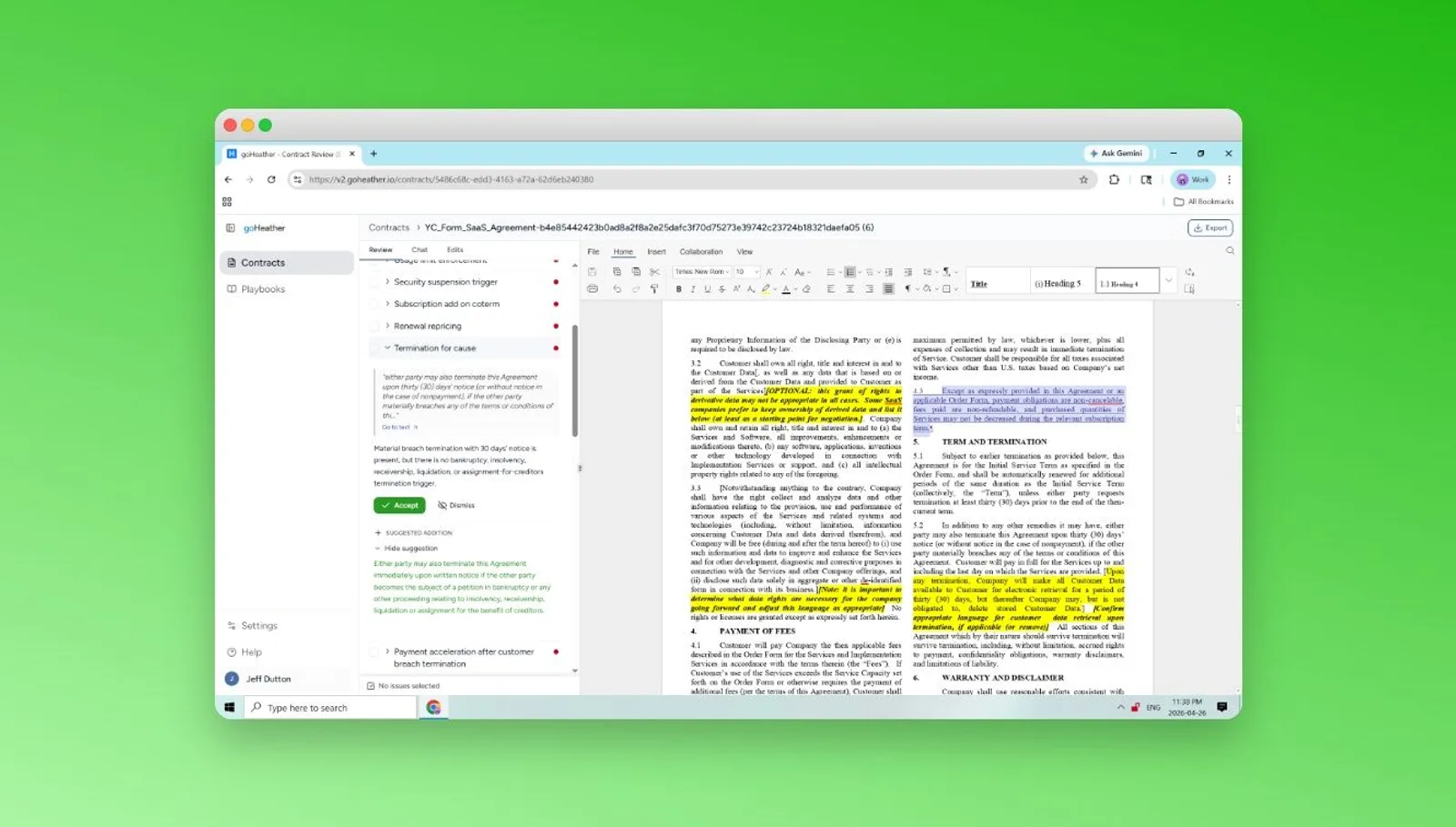
Each review returns findings grouped into High, Med and Low bands, with each one named for the problem: "Data privacy indemnity is uncapped", "Amendment process is one-sided". Open a finding and you get the original clause with its section number, a suggested redline, and a plain English note on why the wording is a problem and which side it hurts.
The WorldCC Foundation's Contract Design Pattern Library describes clause summaries as "short, plain language summaries placed next to the original clauses". That is the shape of a goHeather finding, and it is what makes triage fast. A category manager who is not a lawyer can read the plain English note, see which band it sits in, and decide whether this contract goes to legal or goes through.
Here is where the workflow stops. Findings are proposals. Nothing is applied to the document and nothing is closed until a person picks Flag, Dismiss or Apply redline on each one. The app keeps score ("9 findings left undecided") and will not let you chat about the contract until every finding has a decision. goHeather never marks a contract low risk on its own. You do, after looking at what it found.
Your standard decides what counts as a problem
A review with no playbook attached is general; the app labels it "No playbook - general law". That is fine for a first look, but triage across a hundred suppliers needs your standard. One MSA in a goHeather account was reviewed against five different playbooks and came back with 17, 16, 8, 8 and 8 findings. The playbook decides what counts.
A playbook rule carries your primary position, fallback positions, unacceptable deviations and guidance notes, so a finding can be marked unacceptable instead of just flagged. You can generate one from a standard contract in about a minute, though the app itself says to read and edit it before you trust it. And when a reviewer makes a call on a live finding, "Add to playbook" turns that one judgment into a rule applied to the next supplier contract that comes in. That loop is what keeps triage consistent after the person who built the first playbook has moved on.
Once a contract has made it past triage, the walkthrough of a first-pass AI review of a master service agreement shows how the full review runs, and the goHeather AI contract review software page has the rest of the detail.
This is legal information, not legal advice; consult a lawyer for legal advice.
Review any Contract With AI Before you Sign it