FALL 2026 UPDATE
goHeather is now a full legal AI. Create documents, review documents, research the law.
Book a Demo



Statements of Work and Order Forms AI Review: A Practical Guide
A master agreement gets the legal scrutiny. It is negotiated, redlined, signed, and filed. The deals that follow it tend to move on Statements of Work and Order Forms. Those are the documents that define what the vendor will actually do, when, for how much, and what counts as accepted.
A SOW or order form sits underneath the MSA, but it can change the terms of the deal. It can extend a term. It can introduce a new escalator. It can carve back a warranty. It can incorporate vendor terms by reference to a URL the vendor controls. These patterns are not unusual, and they are where unpriced risk often accumulates.
This is a working guide to how AI can review a SOW or order form, why a useful review has to operate on three levels at once, and what to ask of any tool you are evaluating.
A SOW or order form is its own document. It has its own scope, its own commercial terms, its own acceptance language, its own renewal mechanics. There are issues you can find by reading it on its own. A milestone without acceptance criteria. An expense regime with no cap. Auto-renewal language buried in the price section. A unilateral change-order process. An escalator with no ceiling.
It is also a child document of the MSA. The MSA sets the structural rules: liability cap, indemnity, IP ownership, warranty terms, governing law. The SOW is supposed to live inside those rules. In practice, a SOW or order form can carry language that conflicts with the MSA, expressly or by implication. A sub-cap on liability that is lower than the MSA's general cap. A short-form addendum that says the vendor's standard terms govern, even if the MSA says they do not. A reference to a vendor-controlled "service description" that can change without notice.
A SOW review therefore has an awkward shape. There is the standalone read. There is the read against the MSA. And there is the read against the company's own playbook, business context, and any specific positions the team is taking on this deal.
A person can do all three. It takes time, the right level of expertise, and access to the parent agreement and the playbook. The time is not always there.
Three reads, run as one pass.
First, the standalone review. The AI extracts and structures the commercial terms: price, payment schedule, term, renewal, scope, deliverables, acceptance criteria, expense treatment, and any fees not labeled as fees. It surfaces issues visible on the document's own merits.
Second, the contextual review against the MSA. The AI compares the SOW or order form against the parent agreement. Does the SOW conflict with it? Does it expand the vendor's rights? Does it carve back warranties, indemnities, or termination protections? Do payment terms differ from those in the MSA?
Third, the playbook and context review. A company can have positions on escalators, auto-renewal notice periods, payment terms, sub-processor flow-down, and other recurring issues. A useful AI tool lets the user load those positions once and apply them across every SOW and order form. It also lets the user add deal-specific context for the document in front of them, such as a note that a particular vendor missed an SLA last year and the team wants to hold the line on uptime credits.
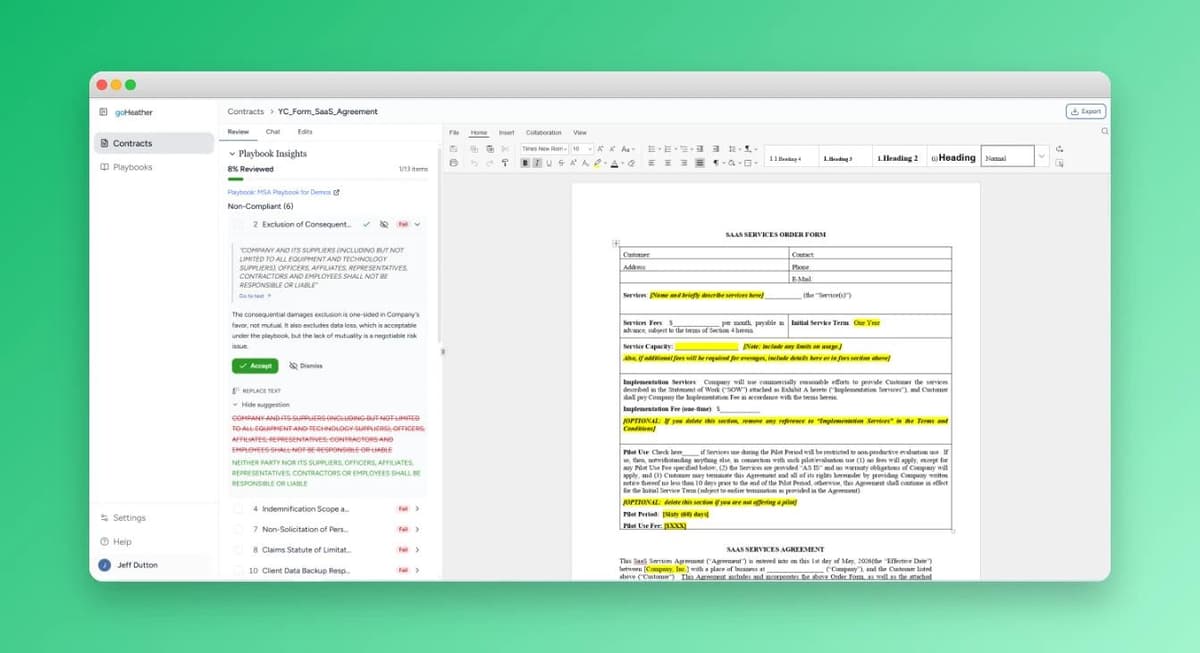
The output should be short. A list of issues with the specific clause text, the relevant playbook position or MSA reference, and a suggested edit that can be applied without leaving the tool. All three reads, fused into one list.
That is what seamless means here. One checklist, with the standalone issue, the MSA conflict, and the playbook breach all visible in the same place, and with the right context attached to each.
You can paste a SOW into a frontier model and get a thoughtful read on its own merits. The intelligence is real. The limitation is what the model does not have.
A frontier model does not have the company's MSA unless the user pastes it in. It does not have the company's playbook unless the user pastes it in. It does not retain that context between documents. The output is also returned as text. The user then has to translate the suggestions into edits in the actual document, clause by clause.
goHeather is built on the same frontier models. The intelligence is the same. What changes is the workflow around it. The MSA and the playbook are loaded once. A custom prompt or deal-specific context can be added per document. Issues come back as a checklist beside the document, with suggested edits that can be applied with a click.
Consider a typical scenario. A vendor sends an order form for a renewal. The user uploads it alongside the underlying MSA. They add a one-line note: "renewal. The escalator last year was already too high. Push back."
goHeather pulls out the commercial terms, runs them against the MSA, runs them against the playbook, and reads the note.
The output is a list of issues. In this scenario, six come back. The auto-renewal notice has been shortened from the prior period to thirty days. The annual escalator exceeds the playbook's cap, and is flagged twice: once for the playbook breach, once against the user's note. A new line item appears that was not in last year's order. The order form references a vendor URL for the "current support policy." Payment terms are shorter than the MSA's net-60. A liability sub-cap appears on the order form that is lower than the MSA's general cap.
For each issue, the tool shows the offending clause, the relevant playbook or MSA reference, and a suggested edit. The user accepts some, edits others, and ignores any that should be ignored. The redline goes back to the vendor.
The same loop applies whether the document is a one-page order form or a longer SOW with an exhibit.
A short list to pressure-test any vendor pitch.
If a tool cannot do those things, the analyst is still doing most of the work by hand.
The MSA sets the rules. The SOW or order form is where the actual deal lives, and it is where commercial terms can drift from what was agreed at the MSA level. Reviewing the SOW on its own catches part of the picture. Reviewing it against the MSA and a playbook catches more.
The case for AI is narrow and practical. The judgment calls still belong to the lawyer or the analyst. What changes is the time it takes to surface the issues that need a judgment call.
Book a demo or start a free trial to see how goHeather handles your next SOW or order form.
Jeff Dutton is a lawyer who advises on technology, corporate, privacy, commercial, employment and real estate law.
Jeff founded his own small law firm, Dutton Law, in 2016 (and merged it with a larger firm in 2019). Before that, Jeff was a prosecutor and a commercial law lawyer at a national boutique law firm.
Jeffrey is a frequent lecturer on legal matters and has been published in newspapers and trade journals. In addition, Jeff was the editor and co-author of a leading employment law text for lawyers for many years.
Education:
Western University, BA (2009)
University of Ottawa, Faculty of Law, JD (2012)
Get the latest contract tips, updates, and exclusive content straight to your inbox. Subscribe now and never miss out on what's new in contract law or at goHeather!
Our AI sifts through each clause, identifying potential risks. This enables us to provide quick yet comprehensive contract reviews, equipping you with the legal information you need to make informed decisions.
USA
1 Sansome St., Suite 1400
San Francisco, CA 94104
United States
International
10 Dundas St. East, Suite 1002
Toronto, ON M5B 2G9
Canada